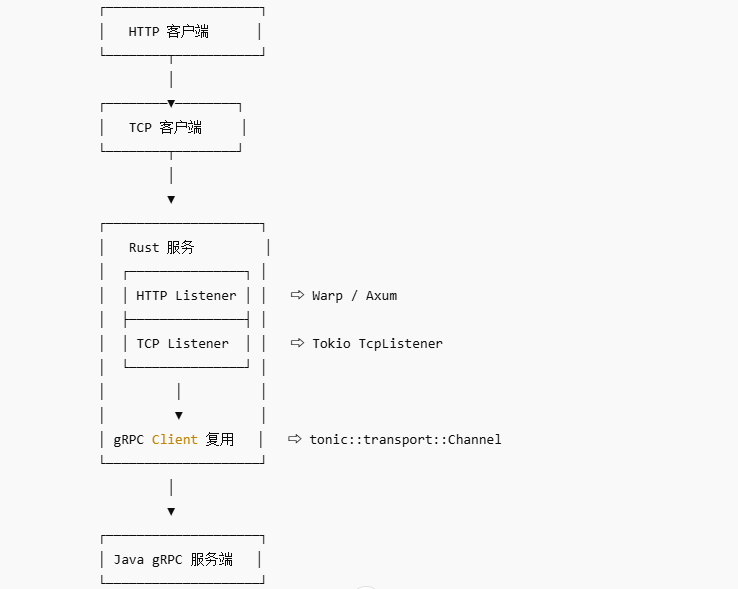
实现一个Java作为服务端,Rust作为客户端的Grpc通信系统。适用于跨语音,框架之间的通信。
1.安装Protoc
Windows系统可以参考ApiFox官网文档。 Macos系统建议使用Homebrew安装
 能够显示版本号说明安装成功
2. 项目的创建和proto文件的管理
建议将Rust项目,Java项目,proto文件放在一个repo中进行管理
类似于下面的结构:

编写proto,生成Java和Rust的解析解析文件
1. 编写proto文件
syntax = "proto3";

package user;

option java_multiple_files = false;
option java_package = "com.carlos.grpc.protos.user.proto";
option java_outer_classname = "UserProto";

message User {
    uint64 id = 1;
    string name = 2;
    string email = 3;
    uint64 created_at = 4;
}

message GetUserRequest {
    uint64 id = 1;
}

message CreateUserRequest {
    string name = 1;
    string email = 2;
}

service UserService {
    rpc GetUser(GetUserRequest) returns (User) {}
    rpc CreateUser(CreateUserRequest) returns (User) {}
}
文件头部指定生成文件名和包名,构建两个Api,一个查询,一个创建。
2. 生成Java代码
需要借助于Netty进行生成。
- 新建一个Springboot项目(java8,springboot2.6.13),安装依赖:
        <dependency>
            <groupId>io.grpc</groupId>
            <artifactId>grpc-netty-shaded</artifactId>
            <version>1.70.0</version>
        </dependency>
        <dependency>
            <groupId>io.grpc</groupId>
            <artifactId>grpc-protobuf</artifactId>
            <version>1.70.0</version>
        </dependency>
        <dependency>
            <groupId>io.grpc</groupId>
            <artifactId>grpc-stub</artifactId>
            <version>1.70.0</version>
        </dependency>
        <dependency> <!-- necessary for Java 9+ -->
            <groupId>org.apache.tomcat</groupId>
            <artifactId>annotations-api</artifactId>
            <version>6.0.53</version>
            <scope>provided</scope>
        </dependency>
- 安装maven插件,用于编译proto文件为Java类
<build>
        <extensions>
            <extension>
                <groupId>kr.motd.maven</groupId>
                <artifactId>os-maven-plugin</artifactId>
                <version>1.6.2</version>
            </extension>
        </extensions>
        <plugins>
            <plugin>
                <groupId>org.apache.maven.plugins</groupId>
                <artifactId>maven-compiler-plugin</artifactId>
                <version>3.8.1</version>
                <configuration>
                    <source>1.8</source>
                    <target>1.8</target>
                    <encoding>UTF-8</encoding>
                </configuration>
            </plugin>
            <plugin>
                <groupId>org.xolstice.maven.plugins</groupId>
                <artifactId>protobuf-maven-plugin</artifactId>
                <version>0.6.1</version>
                <configuration>
                    <!--suppress UnresolvedMavenProperty -->
                    <protocArtifact>com.google.protobuf:protoc:3.21.2:exe:${os.detected.classifier}</protocArtifact>
                    <pluginId>grpc-java</pluginId>
                    <!--suppress UnresolvedMavenProperty -->
                    <pluginArtifact>io.grpc:protoc-gen-grpc-java:1.70.0:exe:${os.detected.classifier}</pluginArtifact>
                    <protoSourceRoot>${project.basedir}/../proto</protoSourceRoot>
                </configuration>
                <executions>
                    <execution>
                        <goals>
                            <goal>compile</goal>
                            <goal>compile-custom</goal>
                        </goals>
                    </execution>
                </executions>
            </plugin>
            <plugin>
                <groupId>org.springframework.boot</groupId>
                <artifactId>spring-boot-maven-plugin</artifactId>
                <version>${spring-boot.version}</version>
                <configuration>
                    <mainClass>com.carlos.grpc.JavaGrpcApplication</mainClass>
                    <skip>true</skip>
                </configuration>
                <executions>
                    <execution>
                        <id>repackage</id>
                        <goals>
                            <goal>repackage</goal>
                        </goals>
                    </execution>
                </executions>
            </plugin>
        </plugins>
    </build>
这里的protobuf-maven-plugin就是用于生成Java类的插件。
configuration中指定protoc的版本,指定proto文件的位置,由于是在项目同级目录下的proto文件夹下,所以指定目录为${project.basedir}/../proto.
- 使用插件编译proto文件
插件安装成功后,maven下会显示插件命令:
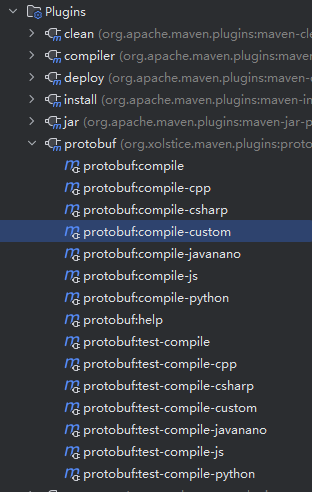
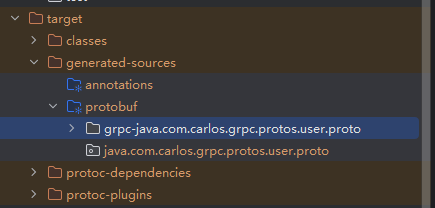
执行compile和compile-custom会生成对应proto文件的基类和服务类。
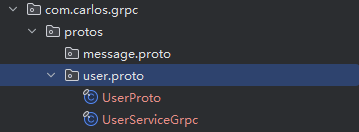
生成的位置在target目录下,路径为proto文件中指定的报名,可以将生成的文件安装包名复制到项目内
3. 编写Java服务类,启动项目.
- 新建GrpcUserService,集成服务类中的Base类。
可以从request中获取请求参数,参数为proto文件中指定的参数名和参数类型。
使用构造器模式构建返回数据,由于Grpc是基于Http2的双工协议,所以使用观察者模式监听response的变化,使用onNext返回结果.
@Component
public class GrpcUserService extends UserServiceGrpc.UserServiceImplBase {

    @Override
    public void getUser(UserProto.GetUserRequest request, StreamObserver<UserProto.User> responseObserver) {
        long id = request.getId();
        UserProto.User.Builder builder = UserProto.User.newBuilder();
        try {
            UserProto.User response = builder.setId(id).setName("张三").setCreatedAt(LocalDateTime.now().toEpochSecond(ZoneOffset.ofHours(8)))
                    .build();
            responseObserver.onNext(response);
        }finally {
            responseObserver.onCompleted();
        }
    }

    @Override
    public void createUser(UserProto.CreateUserRequest request, StreamObserver<UserProto.User> responseObserver) {
        super.createUser(request, responseObserver);
    }
}
- 启动项目:
@Component
public class GrpcServerRunner implements ApplicationRunner {

    private final GrpcUserService userService;

    public GrpcServerRunner(GrpcUserService userService) {
        this.userService = userService;
    }

    @Override
    public void run(ApplicationArguments args) throws Exception {
        Server server = ServerBuilder.forPort(8999).addService(userService).build().start();
        System.out.println("Starting gRPC server on port 8999...");
        server.awaitTermination();
    }
}
- 控制台打印:
Starting gRPC server on port 8999...
- 项目启动成功
4.创建Rust项目,生成proto解析后的Rust文件
- 新建rust项目,安装所需依赖。
cargo new rust-grpc
cd rust-grpc
cargo add serde -F derive
cargo add anyhow
cargo add prost
cargo add tonic -F zstd -F default -F router
cargo add tonic-build --build
cargo add anyhow --build
cargo add tokio -F full

touch build.rs
tonic用于grpc的的通信,serde用于序列化和反序列化。
- 编辑build.rs,解析proto文件
use anyhow::Result;
use std::fs;

fn main() -> Result<()> {
    fs::create_dir_all("src/pb")?;
    let builder = tonic_build::configure();

    builder
        .out_dir("src/pb")
        .type_attribute(
            ".",
            "#[derive(serde::Serialize,serde::Deserialize)] #[serde(rename_all = \"camelCase\")]",
        )
        .compile_protos(
            &[
                "../proto/user.proto",
            ],
            &["../proto"],
        )?;
    Ok(())
}
读取user.proto文件,将解析生成的struct加上Deserialize宏。
5.编写Rust客户端逻辑
#[tokio::main]
async fn main() -> Result<()> {
    let mut client = UserServiceClient::connect("http://192.168.0.20:8999").await?;
    let response = client
        .get_user(Request::new(GetUserRequest { id: 123u64 }))
        .await?;

    println!("RESPONSE={:?}", response.into_inner());
    Ok(())
}
- 池化连接,添加认证鉴权
使用bb8进行池化,同时添加鉴权信息
cargo add bb8

use std::future::Future;
use std::str::FromStr;
use bb8::ManageConnection;
use tonic::{Request, Status};
use tonic::codegen::InterceptedService;
use tonic::metadata::MetadataValue;
use tonic::service::Interceptor;
use tonic::transport::{Channel, Endpoint};
use crate::pb::user::user_service_client::UserServiceClient;

#[derive(Clone)]
pub struct AuthInterceptor {
    token: String,
}

impl Interceptor for AuthInterceptor {
    fn call(&mut self, mut request: Request<()>) -> Result<Request<()>, Status> {
        let meta_token = MetadataValue::from_str(&self.token).unwrap();
        request.metadata_mut().insert("authorization", meta_token);
        Ok(request)
    }
}

#[derive(Clone)]
pub struct GrpcManager {
    pub endpoint: Endpoint,
    pub token: String,
}

impl ManageConnection for GrpcManager {
    type Connection = UserServiceClient<InterceptedService<Channel, AuthInterceptor>>;
    type Error = tonic::transport::Error;

    fn connect(&self) -> impl Future<Output = Result<<Self as ManageConnection>::Connection, <Self as ManageConnection>::Error>> + Send {
        let endpoint = self.endpoint.clone();
        let token = self.token.clone();

        Box::pin(async move {
            let channel = endpoint.connect().await?;
            let interceptor = AuthInterceptor { token };
            Ok(UserServiceClient::with_interceptor(channel, interceptor))
        })
    }

    fn is_valid(&self, _conn: &mut Self::Connection) -> impl Future<Output = Result<(), <Self as ManageConnection>::Error>> + Send {
        Box::pin(async { Ok(()) })
    }

    fn has_broken(&self, _conn: &mut Self::Connection) -> bool {
        false
    }
}
metadata中携带authorization参数,用于鉴权,可以使用jwt生成token加密信息
- 修改Java服务端代码
 @Component
public class GrpcAuthInterceptor implements ServerInterceptor {
	@Override
	public <ReqT, RespT> ServerCall.Listener<ReqT> interceptCall(ServerCall<ReqT, RespT> serverCall,
																 Metadata metadata,
																 ServerCallHandler<ReqT, RespT> serverCallHandler) {
		String auth = metadata.get(Metadata.Key.of("authorization", Metadata.ASCII_STRING_MARSHALLER));
		System.out.println(auth);
		if (!StringUtils.hasText(auth)) {
			return new ServerCall.Listener() {}; // return no-op listener
		}

		return serverCallHandler.startCall(serverCall, metadata);
	}
}

启动的时候添加认证

@Component
public class GrpcServerRunner implements ApplicationRunner {

    private final GrpcUserService userService;

    private final GrpcAuthInterceptor authInterceptor;

    public GrpcServerRunner(GrpcUserService userService, GrpcAuthInterceptor authInterceptor) {
        this.userService = userService;
		this.authInterceptor = authInterceptor;
	}

    @Override
    public void run(ApplicationArguments args) throws Exception {
        Server server = ServerBuilder.forPort(8999).addService(userService).intercept(authInterceptor).build().start();
        System.out.println("Starting gRPC server on port 8999...");
        server.awaitTermination();
    }
}